Figma Plugin
HTML to Figma
Speed up your workflow. Convert AI-generated code into ready-to-iterate canvases, preserving styles and components in seconds.
Figma Plugin
Speed up your workflow. Convert AI-generated code into ready-to-iterate canvases, preserving styles and components in seconds.
Why it exists
Let's be honest: the normal workflow of designing screens from scratch is slow, tedious, and eats up hours of your life pushing pixels. Today, with AI, getting to a functional HTML interface takes a matter of minutes.
This plugin exists so you can prototype with HTML where you're super fast, and convert it to Figma for approval, or present the HTML first and convert it once approved.
The biggest benefit? It gives you real free time. By automating the heavy structuring, you can deliver much faster... or, between us, you can hold on to the design for a couple of days (we both know if you're too efficient at work, they'll just give you more responsibilities). With the time this plugin gives back to you, you get a flawless prototype, meet client deadlines, and earn some margin for a well-deserved nap ;)
Suggested workflow
Not the only way to use it, but the one that gives back the most time.
Generate your code quickly. Make sure to integrate CSS and JS in the same file so the design keeps all its styles and comes to life on the canvas.
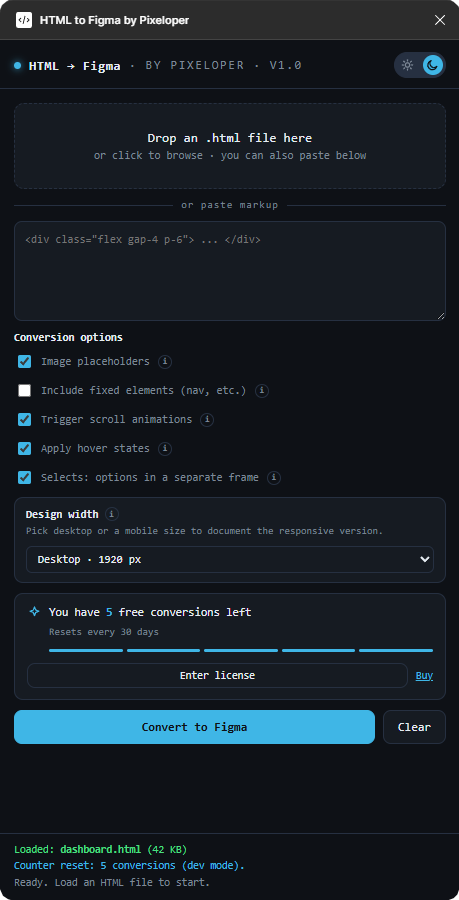
You control the viewport. Instantly select Desktop, Tablet or Mobile format and the design will automatically adapt to your interface's responsiveness.
The plugin does the heavy lifting. It automatically separates complex elements, like selects and pop-ups, into independent components ready for prototyping.
Validate the functional HTML with your client. Then bring it to Figma, make the minimal visual tweaks and hand off the flawless design to the developers.
What to expect
Pricing
It's just $19.90 once, not per month. Before paying anything, you get 5 free conversions every 30 days, enough to see if it does what I say.
Oh, and every license funds the next game.
Speed up your design process and present irresistible proposals in record time.